SMS Notifications & Opt-In
Program: MyTroop Troop Notifications · Operated by Derbytronics LLC
MyTroop is a private communications platform for Scouting America troops, operated by Derbytronics LLC. Each troop has its own subdomain (for example, geneva36.mytroop.org) and its own approved families. This page explains, in the open, how a troop parent chooses to receive text-message notifications and how they can stop them at any time.
Who receives messages
Only adults — parents, guardians, and troop leaders — who hold an account, have been approved into a troop, and have personally opted in by entering their own mobile number and agreeing to the SMS consent prompt. Scouts (children) do not have accounts and are never messaged. Providing a phone number is entirely optional; the platform is fully usable without SMS.
How you opt in
Opt-in happens inside your own signed-in profile:
- Sign in to your troop’s site and open Profile → Edit Profile.
- Enter your mobile number in the optional Phone field. An SMS consent checkbox then appears — unchecked by default.
- Read and check the box to agree. The exact wording you agree to is:
I agree to receive recurring SMS from my troop at this number, including messages from troop leaders and from other troop members, and I understand that replies I send may be shared with the group I am replying to. My phone number is never shown to other members. Message and data rates may apply. Reply STOP to unsubscribe, HELP for help. See Terms and Privacy Policy.
Directly below the checkbox are links to our Terms and Privacy Policy.
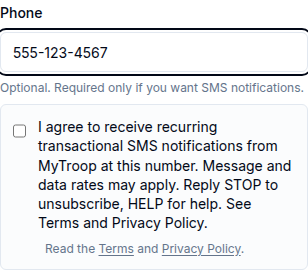
Opt-in is required — it is never assumed
You cannot save a phone number as SMS-eligible without checking the consent box. If you enter a number and try to save without consenting, the change is rejected:
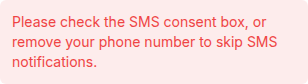
If a troop leader enters your number on your behalf (for example, from a roster import), it is stored but is not treated as consented — our system will never text that number until you personally sign in and check the box.
What you receive, and who it comes from
Messages are troop notifications — event reminders, schedule changes, and urgent announcements. They are sent by leaders and members of your own troop, not by MyTroop as an advertiser, and never by anyone outside your troop.
Troop messaging is a two-way conversation. You can reply to any message, and a reply you choose to send to a group is passed on to the members of that group. Before anything you text is passed on, MyTroop texts you back asking who it should go to, and lists how many people are in each choice. Nothing you send is forwarded until you answer that question — and you can always reply C to cancel.
Your phone number is never shown to other members. Every message is relayed through MyTroop’s own number, so replying to a group does not disclose your number to it.
Message frequency and rates
Frequency varies by troop activity; expect roughly one to four messages per week on average, plus any replies within a conversation you are part of. Message and data rates may apply. MyTroop does not charge any per-message fee.
How to opt out or get help
- Reply STOP to any message to stop all SMS notifications immediately.
- Remove your phone number in Profile → Edit Profile, which also clears your consent record.
- Texting START does not turn messages back on. Because consent has to be given against the wording shown at the time, you turn messaging back on in your own profile.
- Email us at support@mytroop.org.
- Reply HELP to any message, or email the address above, for help.
Your privacy
We do not share, sell, or otherwise provide your mobile phone number or SMS/messaging consent information to any third parties or affiliates for marketing or promotional purposes. Full details are in our Privacy Policy and Terms.